Finx - A Native and WebAssembly Financial Visualizer
How I built a cross-platform financial data visualization tool in C++ using Dear ImGui and ImPlot, and the real challenges you'll hit when doing the same

Overview
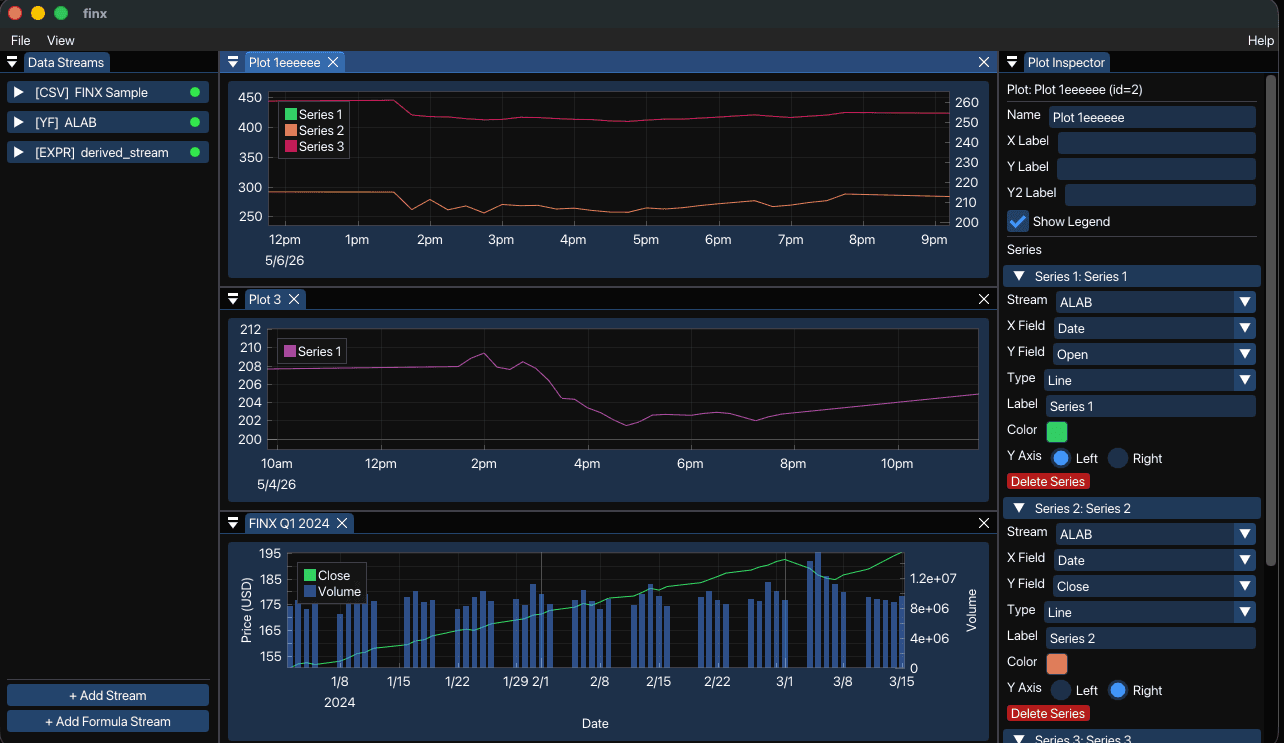
Finx is a native desktop and WebAssembly financial charting tool written in C++. It loads data from CSV files, HTTP APIs, and Yahoo Finance, lets you combine columns with a formula expression engine, and renders everything through interactive ImPlot charts — all from one codebase that compiles to both a native binary and a .wasm bundle served in the browser.
This post walks through the architecture of each major subsystem and the concrete problems you'll run into if you try to build something similar yourself.
Project Structure
The source splits into four focused modules under src/:
| Directory | Responsibility |
|---|---|
src/data/ | Core data model — DataStream, Plot, PlotSeries types; StreamStore and PlotStore managers |
src/expr/ | Expression engine — lexer → parser → evaluator pipeline |
src/io/ | I/O — CSV parser, HTTP client, yfinance bridge, CSV/PNG exporters |
src/persist/ | JSON serialization of stream and plot configs |
src/app.cpp | Application controller — frame loop, docking layout, keyboard shortcuts |
src/main.cpp | Entry point — SDL2/Emscripten bootstrap |
Part 1 — The Data Model
Everything in finx is a DataStream. The struct holds a SourceType enum, the relevant source config, and the fetched columns:
enum class SourceType { CSV_FILE, HTTP_GET, FORMULA, YFINANCE };

struct DataStream {
  uint32_t id;
  SourceType source_type;

  CsvSource    csv;       // filename + raw text
  HttpSource   http;      // url_template + field_map
  YFinanceSource yf;      // ticker + period + interval
  FormulaSource  formula; // expression + bindings

  std::vector<FieldDef> schema;
  // columns stored as parallel vectors keyed by field name:
  std::unordered_map<std::string, std::vector<double>> columns;
  std::unordered_map<std::string, std::vector<std::string>> string_columns;

  StreamStatus status;  // IDLE | LOADING | OK | ERROR_STATE
  bool data_changed;    // reactive dirty flag for dependent plots
  int  row_count;
};Plot objects reference streams by ID through PlotSeries:
struct PlotSeries {
  uint32_t stream_id;
  std::string x_field;
  std::string y_field;
  int y_axis;       // 0 = left, 1 = right (dual Y-axis)
  PlotType plot_type;
  ImVec4 color;
  std::string label;
};The separation between StreamStore (data sources) and PlotStore (visualization config) keeps loading logic and rendering logic fully decoupled.
Part 2 — The Expression Engine
The formula engine is a classic three-stage pipeline: lexer → parser → evaluator.
Lexer
lex_expr() converts an input string into a flat std::vector<Token>. Tokens default-initialize to ERROR type, so any unrecognized character immediately propagates a failure without a separate error path:
Token { type, num, text, col }
TokenType: NUMBER | IDENT | PLUS | MINUS | STAR | SLASH | PERCENT
         | LPAREN | RPAREN | COMMA | END | ERROR
Column positions are tracked in col so error messages can point at the exact character that broke parsing.
Parser
The parser builds an AST from the token stream. Function calls like sma(close, 20) and ema(close, 10) are first-class — the grammar handles arbitrary-arity calls so new rolling functions can be registered without touching the parser.
Evaluator
Evaluation walks the AST over a bound set of column aliases:
struct FormulaBinding {
  std::string alias;      // name used in the expression, e.g. "close"
  uint32_t    stream_id;
  std::string field_name; // actual column in the source stream
};Supported operations:
- Scalar:
abs,sqrt,sin,cos,log,exp, arithmetic operators - Rolling window:
sma(x, n),ema(x, n),stddev(x, n),roc(x, n)(rate of change)
Window functions produce NaN for the first n-1 rows. ImPlot renders NaN values as natural gaps — you get a correct-looking warmup period for free.
A complete MACD expression looks like:
sma(close, 12) - sma(close, 26)
Part 3 — I/O Layer
CSV Parser
The CSV parser auto-detects delimiters and attempts to type each column as NUMBER, TIMESTAMP, or STRING. Timestamps are normalized to Unix epoch doubles so the X-axis time-scaling in ImPlot works without any special handling.
HTTP Client
The HTTP client wraps libcurl. Requests are dispatched on a background thread; the result is pushed onto a queue that the main frame loop drains at the start of each render cycle:
Frame start → drain HTTP result queue → mark stream data_changed = true
            → invalid plot axes → render
This keeps network I/O off the render thread without introducing a callback hell architecture. The HttpSource struct supports:
url_templatewith{{param}}substitutionresponse_format:AUTO(sniffs JSON vs CSV),JSON, orCSVjson_pathdot-notation extraction for nested JSON payloadsfield_mapfor renaming response fields to local schema names
Yahoo Finance Bridge
The yfinance client uses pybind11 to call the Python yfinance library at runtime. It's an optional compile-time feature — if pybind11 isn't found, HAVE_PYBIND11 is not defined and the menu item simply doesn't appear. The integration is entirely contained in src/io/yfinance_client.cpp.
PNG Export
pending_png_path in the App struct acts as a deferred trigger. When set, the next frame reads the OpenGL framebuffer with glReadPixels and writes a PNG via stb_image_write. The one-frame delay ensures the render is fully composited before capture.
Part 4 — The Render Loop and Docking Layout
The application loop follows the standard Dear ImGui pattern:
poll SDL events
→ new ImGui frame
→ drain async result queues
→ check data_changed flags, invalidate plot axes
→ handle global keyboard shortcuts (Ctrl+N/P/S/E)
→ render_stream_panel()   — left sidebar, stream management
→ render_plot_windows()   — one ImGui window per Plot
→ render_plot_inspector() — right sidebar, series config
→ render modals           — add stream, edit source dialogs
→ ImGui::Render() + SDL_GL_SwapWindow()
Docking Layout
ImGui's docking system is initialized once on first launch. The code checks if (!root || root->IsLeafNode()) before regenerating the node tree — this preserves user-customized window positions stored in imgui.ini on subsequent launches:
ImGuiID dock_center_id;  // updated each frame, not stored
// kStreamPanelWidth  = 220.0f
// kInspectorWidth = 280.0fThe two sidebar widths are compile-time constants. The center dockspace expands to fill whatever remains.
Part 5 — Cross-Platform Build (Native + WebAssembly)
The Makefile detects the platform and routes to the right compiler:
| Target | Compiler | Key flags |
|---|---|---|
| Linux | g++ | -std=c++17 -O2, links SDL2, OpenGL, curl, pthreads |
| macOS | g++ | Adds -framework Cocoa -framework IOKit |
| Web | em++ | -Os, WASM=1, USE_WEBGL2=1, FULL_ES3=1 |
The WebAssembly build disables exceptions (-fno-exceptions) and exports two C symbols to JavaScript:
-s EXPORTED_FUNCTIONS='["_main","_finx_csv_loaded"]'_finx_csv_loaded is called from JS when a user drops a file into the browser — Emscripten's virtual filesystem doesn't have a native file picker, so the HTML shell handles the <input type="file"> element and passes the content through this bridge function.
Asset files (fonts, sample data) are bundled into the WASM binary via --preload-file assets. The heap can grow dynamically with ALLOW_MEMORY_GROWTH=1 to handle large CSV uploads.
Challenges to Watch Out For
These are the concrete problems that come up when building a tool like this. Each one looks manageable until you're inside it.
1. Column type detection is deceptive
Auto-typing CSV columns sounds simple — try parsing as number, fall back to string. In practice, financial CSVs contain:
- Date strings in six different formats (
2024-01-05,Jan 5, 2024,1704412800, Unix epoch) - Empty cells mid-column that break a type inference pass
- Mixed columns where most rows are numeric but the header bleeds through
The fix: parse dates in a priority-ordered format list, normalize everything to Unix epoch doubles, and treat any non-parseable cell as NaN rather than STRING when the column is otherwise numeric.
2. The NaN warmup problem with rolling windows
sma(close, 20) has 19 undefined rows at the start. If you store these as 0.0, the chart axis will auto-fit to zero and compress your actual data. If you skip them entirely (shorter output vector), the X/Y vectors go out of sync.
The fix: store std::numeric_limits<double>::quiet_NaN() for warmup rows. ImPlot skips NaN values on render and auto-fit excludes them. Keep vector lengths equal to the source column — never truncate.
3. Thread safety with async I/O
libcurl can't run on the main thread without blocking the render loop. But ImGui state is not thread-safe — you can't touch StreamStore from a background thread mid-frame.
The fix: a producer/consumer queue. The HTTP thread pushes raw results; the main loop drains the queue at a single, well-defined point before any rendering. Never touch ImGui or store state from background threads.
4. Emscripten file I/O is entirely virtual
In native builds, fopen("data.csv") just works. In WebAssembly, the filesystem is a virtual FS initialized at startup. Files dragged into the browser window need to be loaded via JS, passed through the Emscripten API (EM_ASM or exported C functions), and written into the virtual FS before your C++ code can read them.
The fix: export _finx_csv_loaded(const char* name, const char* data, int len), call it from the JS drop handler, write the data into Emscripten's FS with FS.writeFile(), then resume normal C++ file parsing.
5. pybind11 + Python embedding lifetime
Initializing a Python interpreter (Py_Initialize()) inside a C++ application that also runs SDL2 and OpenGL has ordering constraints. Python's GIL, signal handlers, and atexit hooks all interact with the host process in ways that are hard to predict. On macOS, mixing Python's framework-linked libpython with SDL's event loop causes intermittent crashes at shutdown.
The fix: make yfinance entirely optional at compile time. When present, initialize the interpreter once at app start, acquire/release the GIL around every Python call, and don't call Py_Finalize() — let the process exit clean it up.
6. ImGui docking state desync
ImGui's docking system saves window positions to imgui.ini. If you regenerate the dockspace node tree every frame, the saved layout is overwritten on startup and the user's arrangement is lost. But if you never regenerate it, adding a new window that doesn't fit the existing layout leaves it floating with no home.
The fix: check root->IsLeafNode() before building the initial layout. Only build the default layout when there's no saved state. Let imgui.ini win on subsequent launches.
7. Dual Y-axis and axis fitting interact badly
When a plot has two Y-axes — say, price on the left and volume on the right — ImPlot's FitThisFrame() fits both axes to their combined data range simultaneously. If volume is in millions and price is in tens, the price axis collapses to a nearly flat line.
The fix: call ImPlot::SetNextAxesLimits() separately per axis after computing the min/max of each series group. Don't rely on auto-fit for multi-axis plots.
Building It
# Clone and fetch single-header deps
git clone https://github.com/raybello/finx
cd finx
make deps

# Native desktop build
make run

# WebAssembly (requires Emscripten SDK activated)
make serve # builds and starts local HTTP serverThe ISA compliance tests (for formula evaluation) run with:
make testSummary
Finx is a good example of what happens when you commit to a single C++ codebase for both desktop and browser targets. The ImGui/ImPlot stack handles the rendering uniformly; Emscripten handles the platform delta. The hard parts are at the seams: async I/O without blocking the render thread, NaN-safe data pipelines, virtual filesystem bridging for WebAssembly, and keeping the docking layout sane across launches.
The full source is at github.com/raybello/finx. The live demo runs entirely in your browser with no install required.